

Tool loss is rarely the result of carelessness. On most job sites, it happens because systems break down under pressure. Crews rotate, tools move between vans, and deadlines compress decision-making. Even well-run teams lose track of equipment once work ramps up.
The real cost is not just replacement. It is downtime. Crews waiting for missing tools, jobs paused while replacements are sourced, and supervisors pulled away from productive work to chase equipment. Within the wider Milwaukee cordless and corded tool range, ONE-KEY is often positioned as a tracking feature, but its real value lies in how it supports operational discipline on busy sites. Used properly, it helps teams understand where tools go, how they move, and where breakdowns in process actually occur.
Why Tool Loss and Downtime Happen in the First Place
Most tool loss happens during transitions rather than active work. End-of-day pack-downs, site moves, crew changes, and shared storage areas create blind spots. Tools are borrowed “for five minutes” and not logged. Vans get loaded quickly. Responsibility becomes assumed rather than confirmed.
Downtime follows a similar pattern. A missing tool stops one task, which delays the next. Crews improvise with the wrong equipment or wait for replacements. Small inefficiencies stack up, turning minor losses into measurable productivity hits.
Without a system that reflects how tools actually move on site, even experienced teams rely too heavily on memory and informal handovers.
What Milwaukee ONE-KEY Is Actually Good At
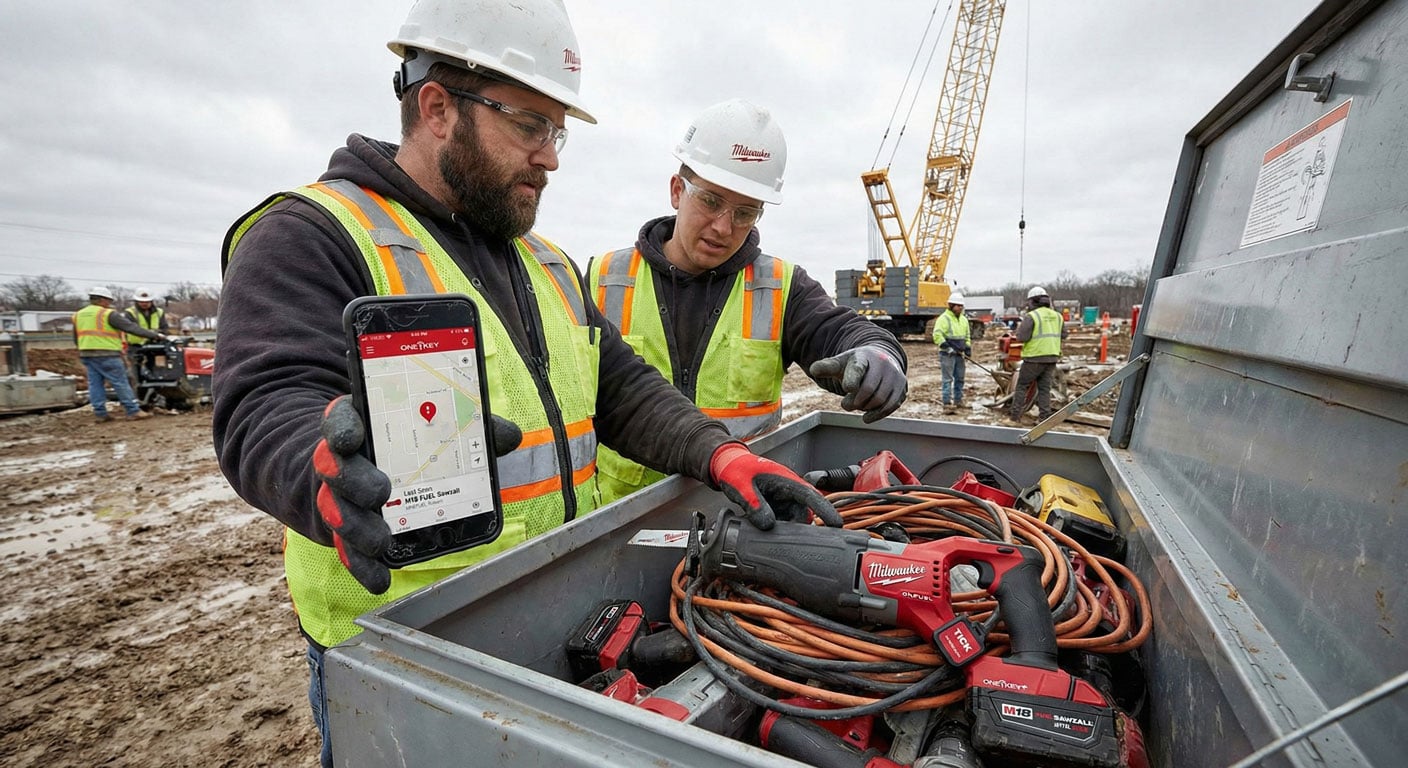
ONE-KEY works best as a visibility and accountability layer, not a real-time tracking solution. It shows where tools were last seen, who they are assigned to, and whether they are active or idle. That information alone changes behaviour.
Lockout features act as a deterrent rather than enforcement. The value is not punishing misuse, but preventing tools from walking off unnoticed. When crews know tools are identifiable and accountable, loss drops without confrontation.
Where ONE-KEY falls short is expecting it to replace site discipline. It does not prevent poor habits. It supports better ones when implemented with clear intent.
Rolling Out ONE-KEY Without Disrupting the Team
The fastest way to fail with ONE-KEY is to tag everything at once. Large rollouts overwhelm crews and create resistance before benefits are visible. A better approach is starting with the tools that cause the most disruption when missing.
High-value, high-use tools should be prioritised first. Supervisors should set the system up, assign ownership, and explain why those tools matter. Early wins build trust and demonstrate value before expanding coverage.
Introducing ONE-KEY as a support tool rather than a monitoring tool makes adoption smoother. The aim is fewer delays, not tighter control.
Tagging and Naming Conventions That Stay Clean Over Time
Poor naming kills asset systems. Inconsistent labels, vague descriptions, and duplicated names make tools harder to find than if they were not tracked at all. Clear, simple naming rules are essential.
Names should reflect how tools are recognised on site. Tool type, size, and unique identifiers work better than personal names or informal nicknames. Consistency matters more than detail.
A system that stays clean six months in is more valuable than a perfectly detailed system that collapses under its own complexity.
Using Checkouts and Alerts Without Annoying the Crew
Checkouts work when they reflect reality. For tools that move frequently between users, rigid checkouts slow work and get bypassed. For specialist tools or high-risk equipment, they create clarity.
Alerts should be set conservatively. Constant notifications desensitise users and get ignored. Alerts should highlight genuine issues, such as tools leaving defined areas or remaining idle when they should be in use.
ONE-KEY is most effective when it quietly supports decision-making rather than constantly demanding attention.
Maintenance Records and Accountability in Practice
Maintenance records often feel like admin until something goes wrong. ONE-KEY changes that by linking usage to wear patterns. Repeated issues become visible, and responsibility becomes clearer without confrontation.
When damage is logged consistently, patterns emerge. Certain tools fail more often. Certain conditions accelerate wear. Maintenance shifts from reactive to preventative.
This reduces downtime and avoids the familiar “it wasn’t me” conversations that stall teams and waste time.
Managing Multiple Sites and Rotating Teams
ONE-KEY shows its strongest value when tools move between sites. Visibility across vans, depots, and locations prevents losses during transitions, which are the most common failure points.
Supervisors gain confidence that tools are where they should be without physically checking every location. Teams moving between jobs start each day with fewer surprises and fewer delays.
The system works best when it supports coordination rather than control.
Making ONE-KEY Part of Daily Site Routine
ONE-KEY only delivers value if it stays in use. Simple habits keep it alive. End-of-day checks, consistent assignments, and regular reviews take minutes but prevent weeks of inefficiency.
Supervisors do not need to manage the system constantly. Periodic checks are enough when the foundations are solid. Consistency matters more than full compliance.
When ONE-KEY becomes part of how sites operate, tool loss drops quietly and downtime reduces without drama.
FAQ’s
Q1: Is ONE-KEY worth using for small teams?
A1: Yes. Small teams often feel tool loss more acutely. Starting with key tools delivers fast value without complexity.
Q2: Does ONE-KEY track tools in real time?
A2: No. It shows last-seen locations and usage data rather than live tracking.
Q3: How many tools should be tagged initially?
A3: Start with the tools that cause the most disruption when missing, then expand gradually.
Q4: Will alerts distract the team during work?
A4: Only if they are set too aggressively. Proper thresholds prevent notification fatigue.
Q5: Can ONE-KEY actually reduce downtime, not just loss?
A5: Yes. By improving visibility, maintenance planning, and accountability, downtime drops alongside loss.